Task
The task here is to implement an agent that plays the Max-Connect4 game using the depth-limited version of MiniMax, with alpha-beta pruning. Figure 1 shows the first few moves of a game. The game is played on a 6x7 grid, with six rows and seven columns. There are two players, player A (red) and player B (green). The two players take turns placing pieces on the board: the red player can only place red pieces, and the green player can only place green pieces.
It is best to think of the board as standing upright. We will assign a number to every row and column, as follows: columns are numbered from left to right, with numbers 1, 2, ..., 7. Rows are numbered from bottom to top, with numbers 1, 2, ..., 6. When a player makes a move, the move is completely determined by specifying the COLUMN where the piece will be placed. If all six positions in that column are occupied, then the move is invalid, and the program should reject it and force the player to make a valid move. In a valid move, once the column is specified, the piece is placed on that column and "falls down", until it reaches the lowest unoccupied position in that column.
The game is over when all positions are occupied. Obviously, every complete game consists of 42 moves, and each player makes 21 moves. The score, at the end of the game is determined as follows: consider each quadruple of four consecutive positions on board, either in the horizontal, vertical, or each of the two diagonal directions (from bottom left to top right and from bottom right to top left). The red player gets a point for each such quadruple where all four positions are occupied by red pieces. Similarly, the green player gets a point for each such quadruple where all four positions are occupied by green pieces. The player with the most points wins the game.
Your program will not do graphics, so there will not be red and green pieces. Instead, one player will be placing 1's on the board, and will be called the 1-player. The other player will be placing 2's on the board, and will be called the 2-player.
Your program will run in two modes: an interactive mode, that is best suited for the program playing against a human player, and a one-move mode, where the program reads the current state of the game from an input file, makes a single move, and writes the resulting state to an output file. The one-move mode can be used to make programs play against each other. Note that YOUR PROGRAM MAY BE EITHER THE 1-PLAYER OR THE 2-PLAYER, THAT WILL BE SPECIFIED BY THE STATE, AS SAVED IN THE INPUT FILE.
As part of this assignment, you will also need to measure and report the time that your program takes, as a function of the number of moves it explores. All time measurements should report CPU time, not total time elapsed. CPU time does not depend on other users of the system, and thus is a meaningful measurement of the efficiency of the implementation.
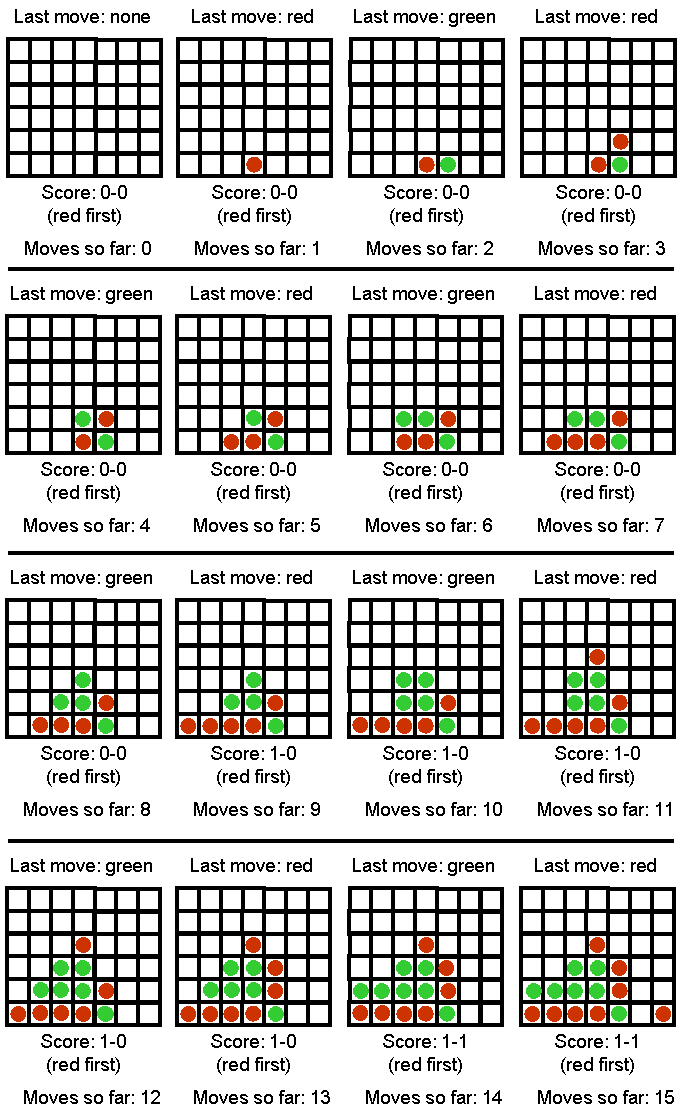
Figure 1. The first 15 moves of a Max-Connect4 game.
Interactive Mode
In the interactive mode, the game should run from the command line with the following arguments (assuming a Java implementation, with obvious changes for C++ and Lisp implementations):
java maxconnect4 interactive [input_file] [computer-next/human-next] [depth]
For example:
java maxconnect4 interactive input1.txt computer-next 7
- Argument interactive specifies that the program runs in interactive mode.
- Argument [input_file] specifies an input file that contains an initial board state. This way we can start the program from a non-empty board state. If the input file does not exist, the program should just create an empty board state and start again from there.
- Argument [computer-next/human-next] specifies whether the computer should make the next move or the human.
- Argument [depth] specifies the number of moves in advance that the computer should consider while searching for its next move. In other words, this argument specifies the depth of the search tree. Essentially, this argument will control the time takes for the computer to make a move.
After reading the input file, the program gets into the following loop:
- If computer-next, goto 2, else goto 5.
- Print the current board state and score. If the board is full, exit.
- Choose and make the next move.
- Save the current board state in a file called computer.txt (in same format as input file).
- Print the current board state and score. If the board is full, exit.
- Ask the human user to make a move (make sure that the move is valid, otherwise repeat request to the user).
- Save the current board state in a file called human.txt (in same format as input file).
- Goto 2.
One-Move Mode
The purpose of the one-move mode is to make it easy for programs to compete against each other, and communicate their moves to each other using text files. The one-move mode is invoked as follows:
java maxconnect4 one-move [input_file] [output_file] [depth]
For example:
java maxconnect4 one-move red_next.txt green_next.txt 5
In this case, the program simply makes a single move and terminates. In particular, the program should:
- Read the input file and initialize the board state and current score, as in interactive mode.
- Print the current board state and score. If the board is full, exit.
- Choose and make the next move.
- Print the current board state and score.
- Save the current board state to the output file IN EXACTLY THE SAME FORMAT THAT IS USED FOR INPUT FILES.
- Exit
Sample code
The sample code needs an input file to run. Sample input files that you can download are input1.txt and input2.txt. You are free to make other input files to experiment with, as long as they follow the same format. In the input files, a 0 stands for an empty spot, a 1 stands for a piece played by the first player, and a 2 stands for a piece played by the second player. The last number in the input file indicates which player plays NEXT (and NOT which player played last).
Sample code is available in:
- Java: download files maxconnect4.java,
GameBoard.java, and
AiPlayer.java. Compile on omega using:
javac maxconnect4.java GameBoard.java AiPlayer.java
An example command line that runs the program (assuming that you have input1.txt saved in the same directory) is:
java maxconnect4 one-move input1.txt output1.txt 10
- Python, version 2.4 (to make sure it runs on omega): download files maxconnect4.py and
MaxConnect4Game.py.
An example command line that runs the program (assuming that you have input1.txt saved in the same directory) is:
./maxconnect4.py one-move input1.txt output1.txt 10
- C++: download file maxconnect4.cpp. Compile on omega using:
g++ -o maxconnect4 maxconnect.cpp
An example command line that runs the program (assuming that you have input1.txt saved in the same directory) is:
maxconnect4 one-move input1.txt output1.txt 10
The sample code implements a system playing max-connect4 (in one-move mode only) by making random moves. While the AI part of the sample code leaves much to be desired (your assignment is to fix that), the code can get you started by showing you how to represent and generate board states, how to save/load the game state to and from files in the desired format, and how to count the score (though faster score-counting methods are possible).
Measuring Execution Time
On your readme.txt file, you should report the time that it takes for your program to make a move, on an empty board, for different depths. You should report time for all depths starting from depth=1, and up to the smallest depth for which it takes longer than 30 seconds to make a move.
You can measure the execution time for your program on omega by inserting the word "time" in the beginning of your command line. For example, if you want to measure how much time it takes for your system to make one move with the depth parameter set to 10, try this:
time java maxconnect4 one-move red_next.txt green_next.txt 10
Your output will look something like:
real    0m0.003s
user    0m0.002s
sys     0m0.001s
Out of the above three lines, the user line is what you should report.
Grading
The assignments will be graded out of 100 points.
- 35 points: Implementing plain minimax. If you only implement the simple version of minimax, with no alpha-beta pruning and not including the depth-limited version, you only get 35 points.
- 35 points: Implementing alpha-beta pruning. If you implement minimax with alpha-beta pruning, but not including the depth-limited version, you get 70 points (35 for minimax, 35 for alpha-beta pruning).
- 30 points: Implementing the depth-limited version of minimax. If you correctly implement the depth-limited version, including alpha-beta pruning, this single implementation will get you all 100 points (30 points for the depth-limited version, in addition to the 35 points for implementing alpha-beta pruning and 35 points for implementing minimax). For full credit, you obviously need to come up with a reasonable evaluation function to be used in the context of depth-limited search. A "reasonable" evaluation function is defined to be an evaluation function that allows your program to consistently beat a random player.
How to submit
Submissions should be made using Blackboard.
Implementations in Python, C, C++, and Java will be accepted. If you would like
to use another language, please first check with the instructor or TA via
e-mail. Points will be taken off for failure to comply with this
requirement.
Submit a ZIPPED directory called assignment3.zip (no other
forms of compression accepted, contact the instructor or TA if you do
not know how to produce .zip files). The directory should
contain:
- A file called answers.xxx, including your answers to the written part of the assignment. Extension xxx in your answers.xxx file depends on the file format you use, which can be PDF, text, Microsoft Word, or Open Office.
- Source code for the programming part. Including binaries is optional.
- A file called readme.txt,
which should specify precisely:
- Name and UTA ID of the student.
- What programming language is used.
- How to run the code, including very specific compilation instructions. Instructions such as "compile using g++" are NOT considered specific. Providing all the command lines that are needed to complete the compilation on omega is specific.
- The time that it takes for your program to make a move, on an empty board, for different depths. You should report time for all depths starting from depth=1, and up to the smallest depth for which it takes longer than 30 seconds to make a move.
Insufficient or unclear instructions will be penalized by up to 20 points.
Code that does not run on omega machines gets AT MOST half credit (50 points), unless you have prior written approval from the instructor or TA.